How I Migrated a Whole Site in a Day with Claude Code
A site migration case study: folding ~1,100 RoadSnacks articles into HomeSnacks in a single day with Claude Code — planning, orchestration, dashboards for validation, and running batches from my phone.
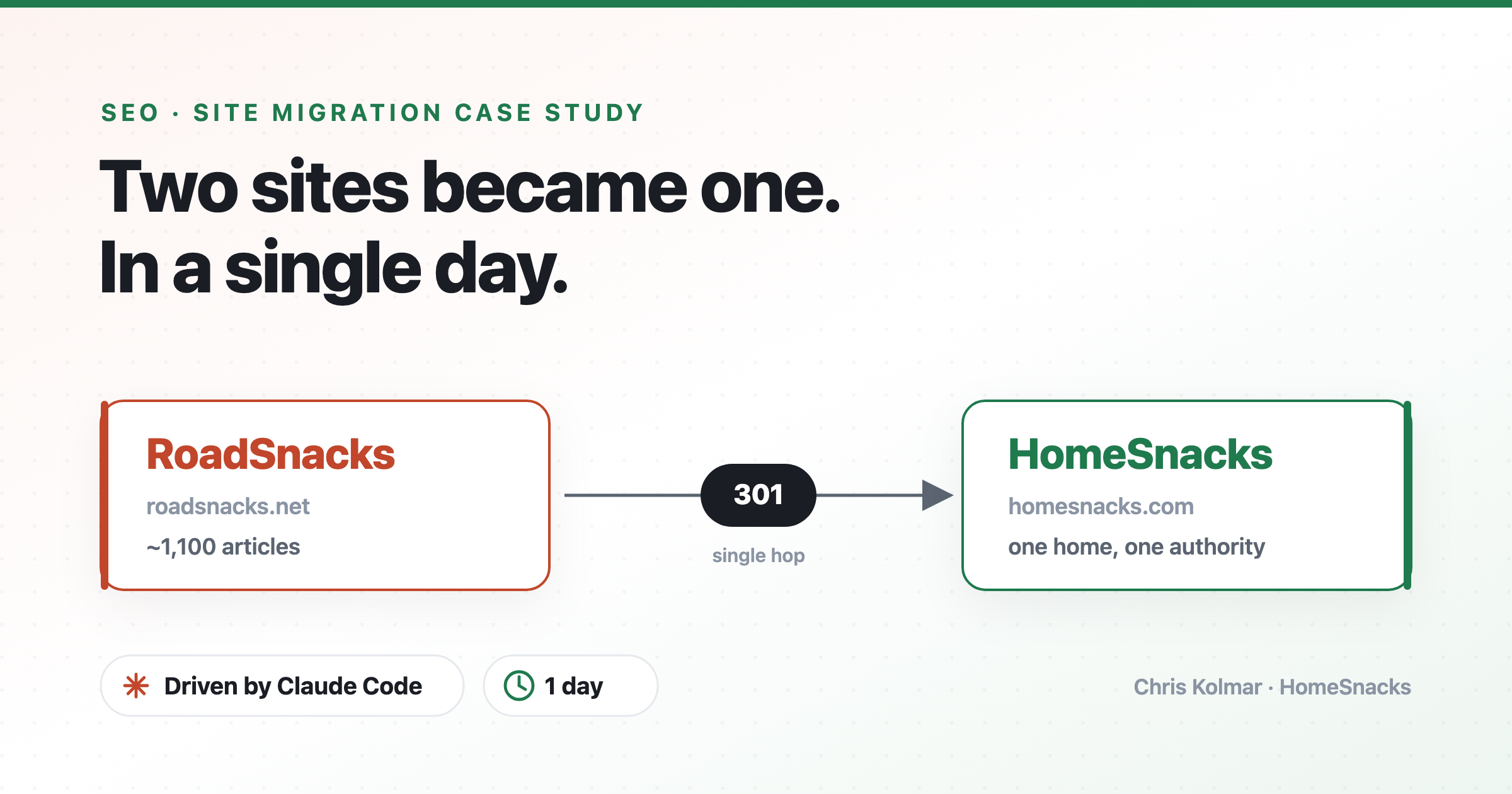
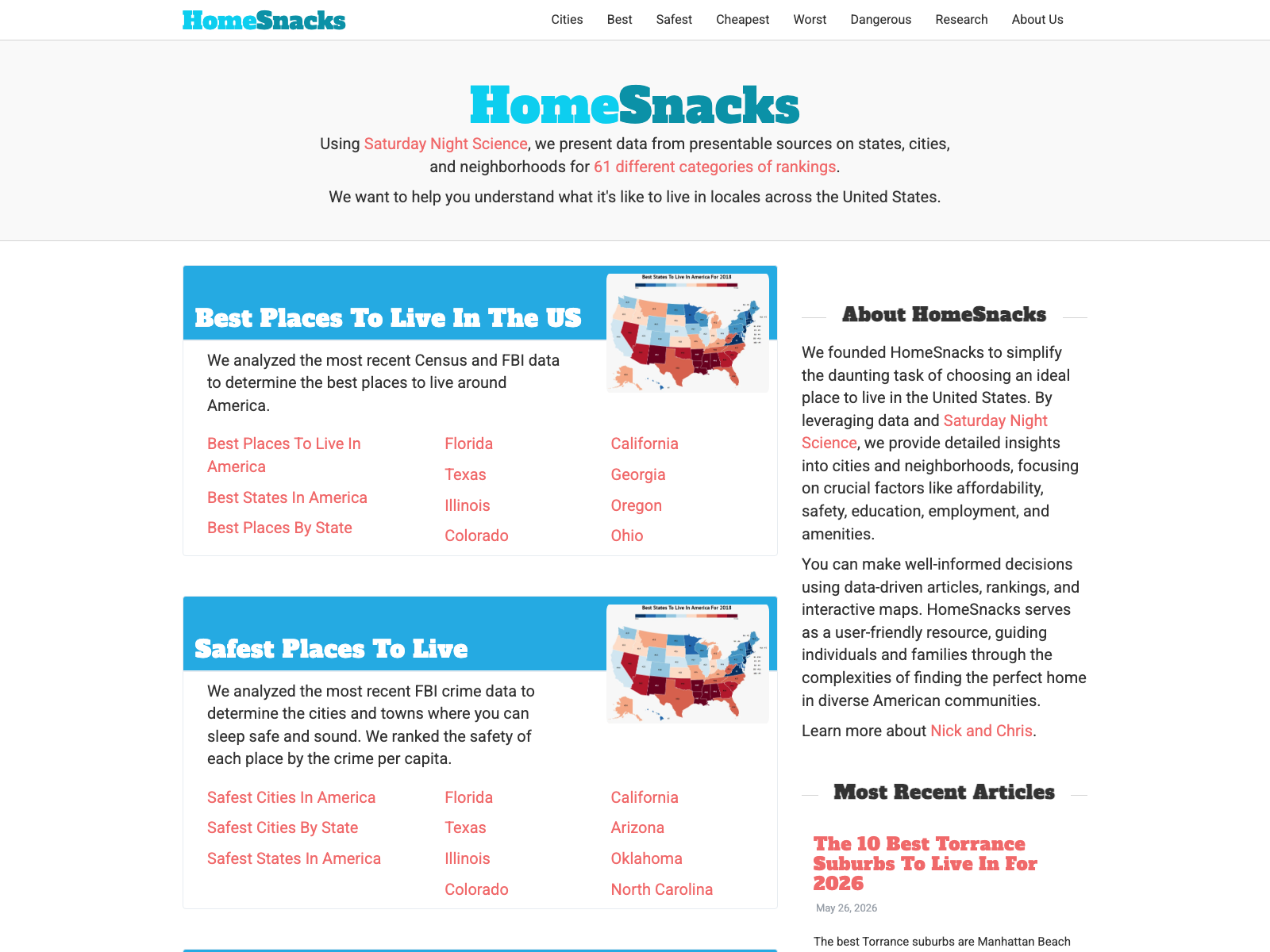
For years I ran two sites, RoadSnacks and HomeSnacks. Both were ranked lists of local content, the “most dangerous cities in X” and “cheapest places to live in Y”. Running two WordPress installs on the side split my time and my search authority right down the middle. I wanted it all under one roof so I could quit babysitting two sites and get on with the HomeSnacks redesign I’ve been planning.
I’d put it off for years, because merging two live sites is scary. Get the redirects wrong and your search traffic falls off a cliff.
I know how scary, because I’ve done it before. Five years ago I migrated homesnacks.net into homesnacks.com entirely by hand: spreadsheets of redirects, find-and-replace plugins across exports, a cutover I white-knuckled the whole way through with wordpress command line functions.
It worked. It worked perfectly, in fact, because I’m good at this. It was just stressful as hell.
The stress came from the tooling, not the plan. I burned days figuring out how to write 301 redirects into Apache .htaccess files. I’ve been building websites for 15 years, but I’m not a sysadmin. I’m a generalist.
This time I had Claude Code, and it did the dirty work. Every script, every bulk rewrite, every batch import, all the typing I used to grind through by hand — Claude Code wrote it and ran it. That left me with the only two jobs that actually needed me: orchestrating the sequence and validating that each step really worked. I merged all ~1,100 RoadSnacks articles into HomeSnacks in a single day, with every old URL pointed at its right new home and every redirect collapsed to one clean hop.
I’m Chris Kolmar. I do growth marketing and SEO for a living, and these days a lot of that work runs through Claude Code. The migration is a great use case.
What this migration was, and wasn't
To be precise about scope: this was a content consolidation, not a re-platform. Both sites were already WordPress on the same host, so I wasn't moving CMSes or rebuilding templates. The job was merging one domain's articles into another, doing some unique mappings, and 301-ing the old domain. It's a domain merge, not a Magento-to-Shopify rebuild. But no matter the migration, the sequence below is the part that matters.
1. It’s a planning problem before it’s an engineering problem
A migration is one tightly ordered sequence, and the order is the entire risk. The only way to defuse it is to write that sequence down before you touch a thing.
So I didn’t start with code. I started with Fable writing the plan: a phased runbook where re-hosting media, importing posts, rewriting links, and flipping the cutover each got its own acceptance check and rollback. That doc became the spine. Every action and every model after it ran against the plan.
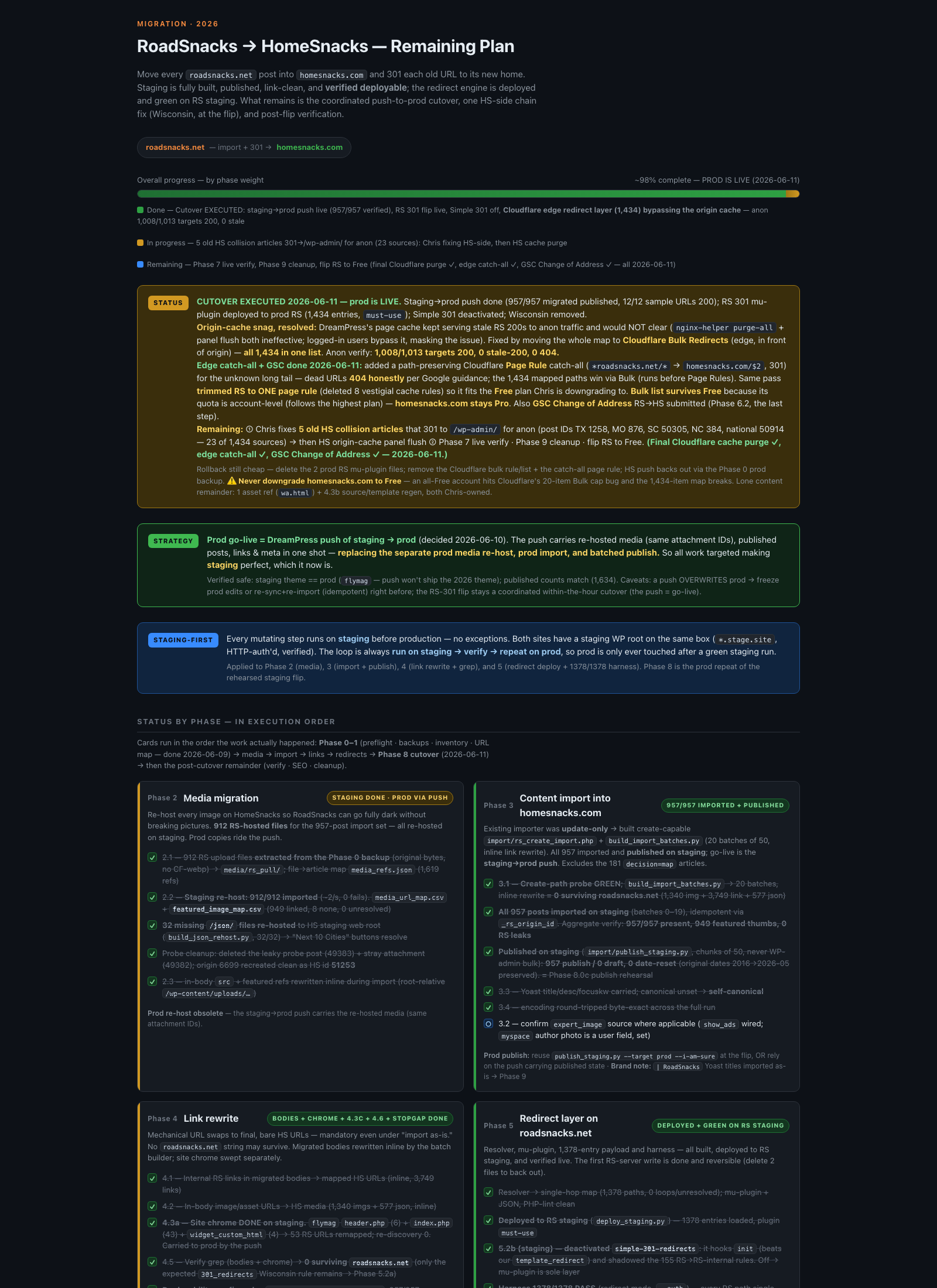
The plan is the migration. Everything after it is execution you can hand off.
2. Three models, three jobs
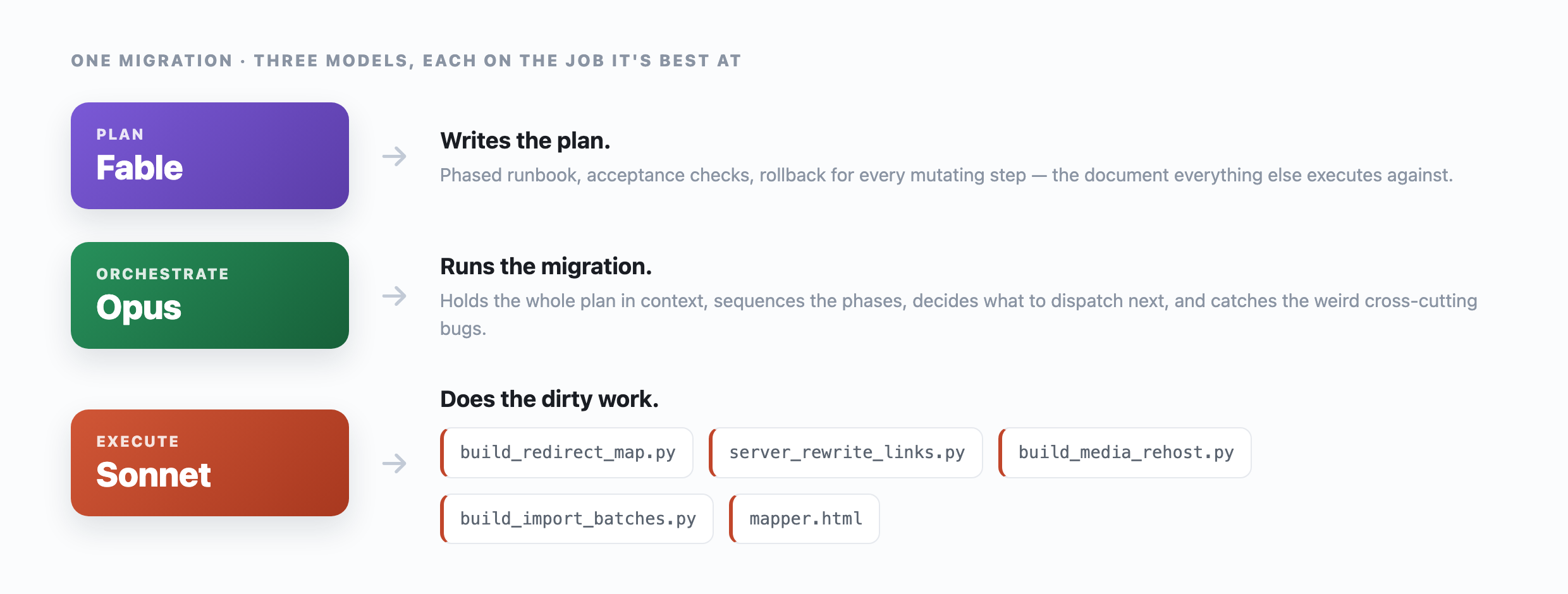
I didn’t use one model for everything. I sent each job to whichever model was most token efficient at it. Because the plan was already written down, handing a phase from one model to the next saved tokens.
- Fable wrote the plans. It’s the one I trust to think through the ordering, the edge cases, and the rollbacks before any code exists.
- Opus orchestrated. It held the whole plan in context, sequenced the phases, decided what to run next, and caught the cross-cutting bugs that only show up when you can see the entire board. The cache trap below was an Opus catch.
- Sonnet did the grunt work, fast and (relatively) cheap. Every script and bulk rewrite and batch import got handed down to Sonnet.
3. The scripts that did the actual work
A migration like this is really a swarm of one-off scripts. Those used to take me hours to write. This time none of it was my work. I described what each script needed to do and Claude Code wrote it and ran it. It maintains the context and content while you verify the outputs.
The repo ended up as 42 one-off scripts across nine phased folders, one folder per phase of the plan (preflight, inventory, media, links, redirects, titles):
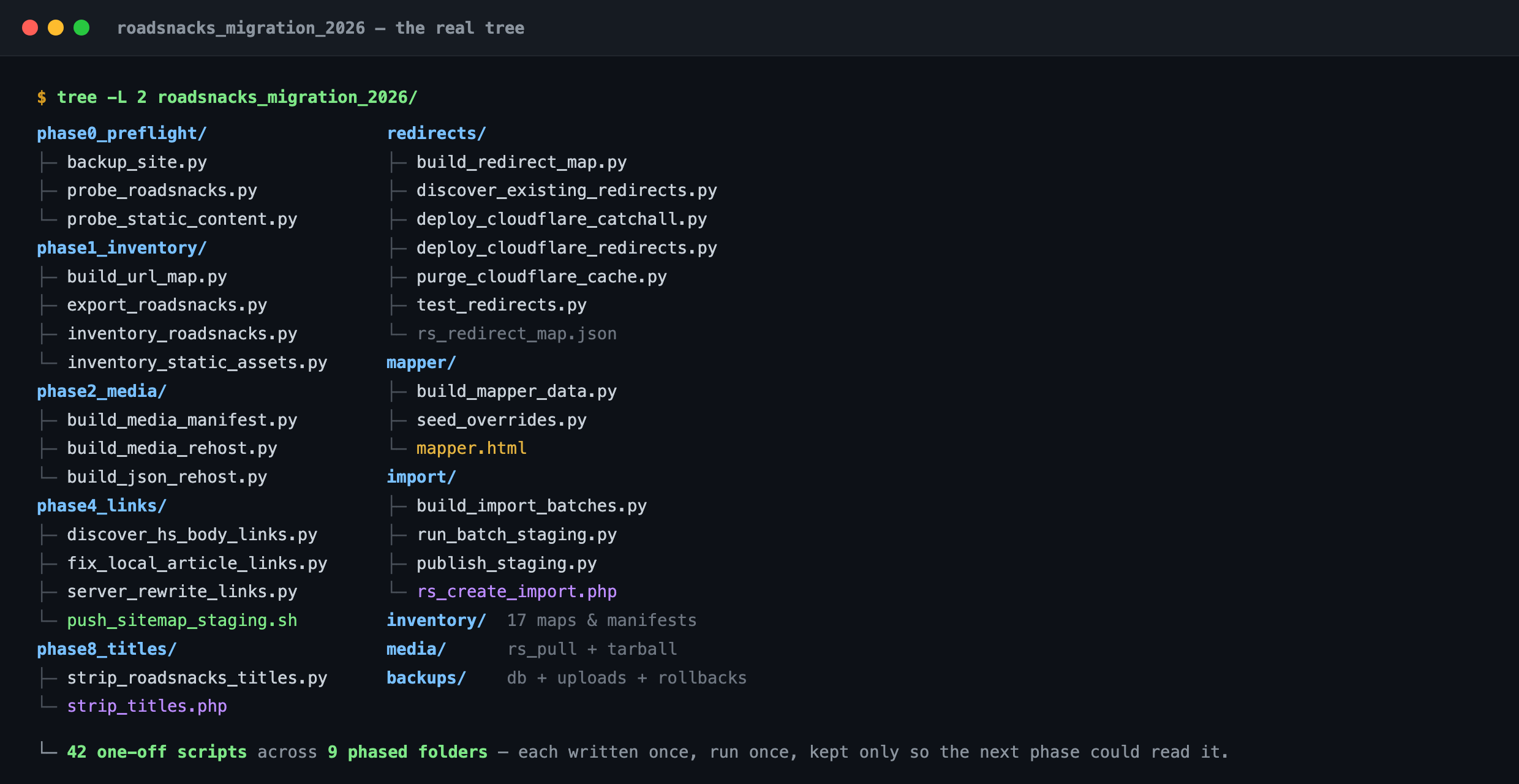
phase0_preflight →
phase8_titles, plus redirects/, mapper/ and
import/. 42 scripts, each written once, run once, kept only so the next
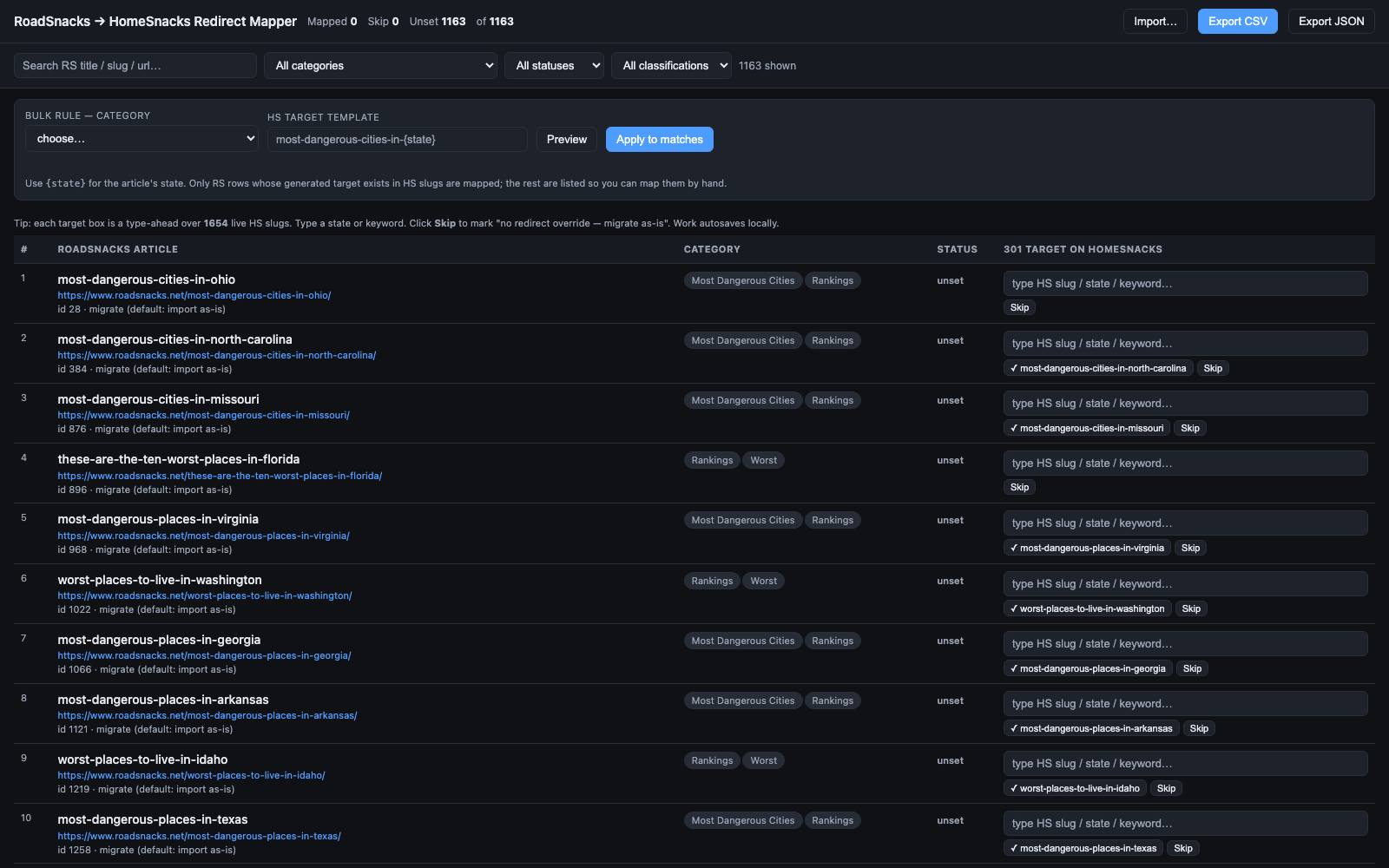
phase could read its output.The most important script wasn’t the biggest. It was one self-contained HTML file, the dedup mapper, that listed every RoadSnacks article next to every existing HomeSnacks slug so I could hand-map the overlaps. “Worst places in Georgia” points at the dangerous-cities page that already exists instead of importing a copy to compete with it.
The biggest by volume was the link rewriter. Every internal link pointing at an old RoadSnacks URL had to be repointed to its final HomeSnacks URL: over 400,000 rewrites across 5,000 files, run in place on the server, with the flattened redirect map as the single source of truth.
It was faster everywhere, too. Last time I moved files between sites with bulk downloads and bulk import plugins. This time Claude wrote native PHP, uploaded it to each server, and updated the files directly.
It also edited content inside existing posts, again the kind of thing I used to need a plugin for. It just wrote the code.
For example, we missed one stray “RoadSnacks” sitting in a Yoast SEO title, and Claude cleaned it up with custom code in a single prompt.
4. Dashboards did the validating, not me squinting at logs
The other thing that drained the manual migration was checking. Every step needs proof it worked, and eyeballing command output is slow and easy to get wrong. So I leaned on dashboards. The plan board doubled as a progress tracker for what was rehearsed, live, or blocked, and I built small read-outs that turned “did it work?” into something I could glance at instead of reconstruct.
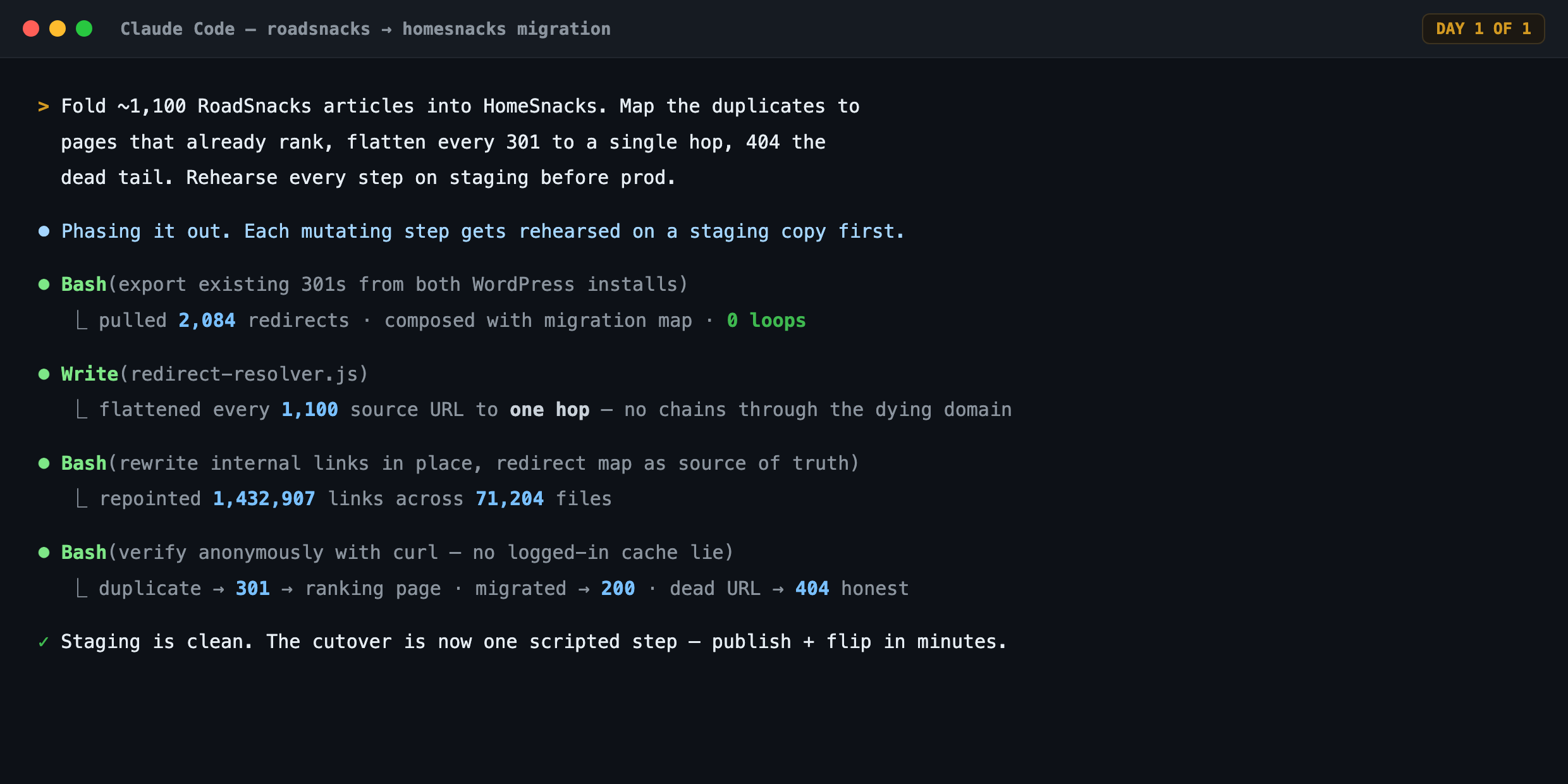
Redirects were the sharpest example. Instead of trusting a green checkmark from a plugin, I had a script curl every old URL anonymously and assert the outcome: a single-hop 301, a real 200, or a 404. That turned validation into a dashboard I could re-run on demand:
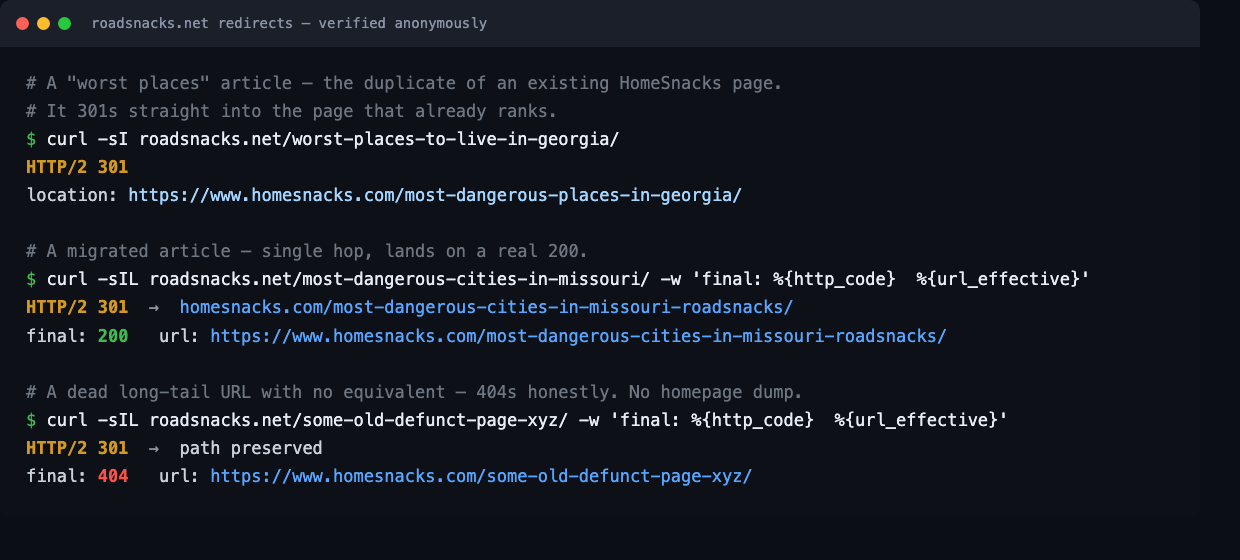
curl: a duplicate
301s into the page that ranks; a migrated article single-hops to a 200; a dead URL
returns a real 404. Green here means green for Googlebot, not just for me.5. I ran half of it from my phone
This part would have been unimaginable five years ago. The plan was written down and the work was already split into safe, resumable batches, so I didn’t need to be at my desk to push it forward. I kicked off and checked import batches from the Claude app on my phone, from the couch and from bed. Opus kept orchestrating in the background.
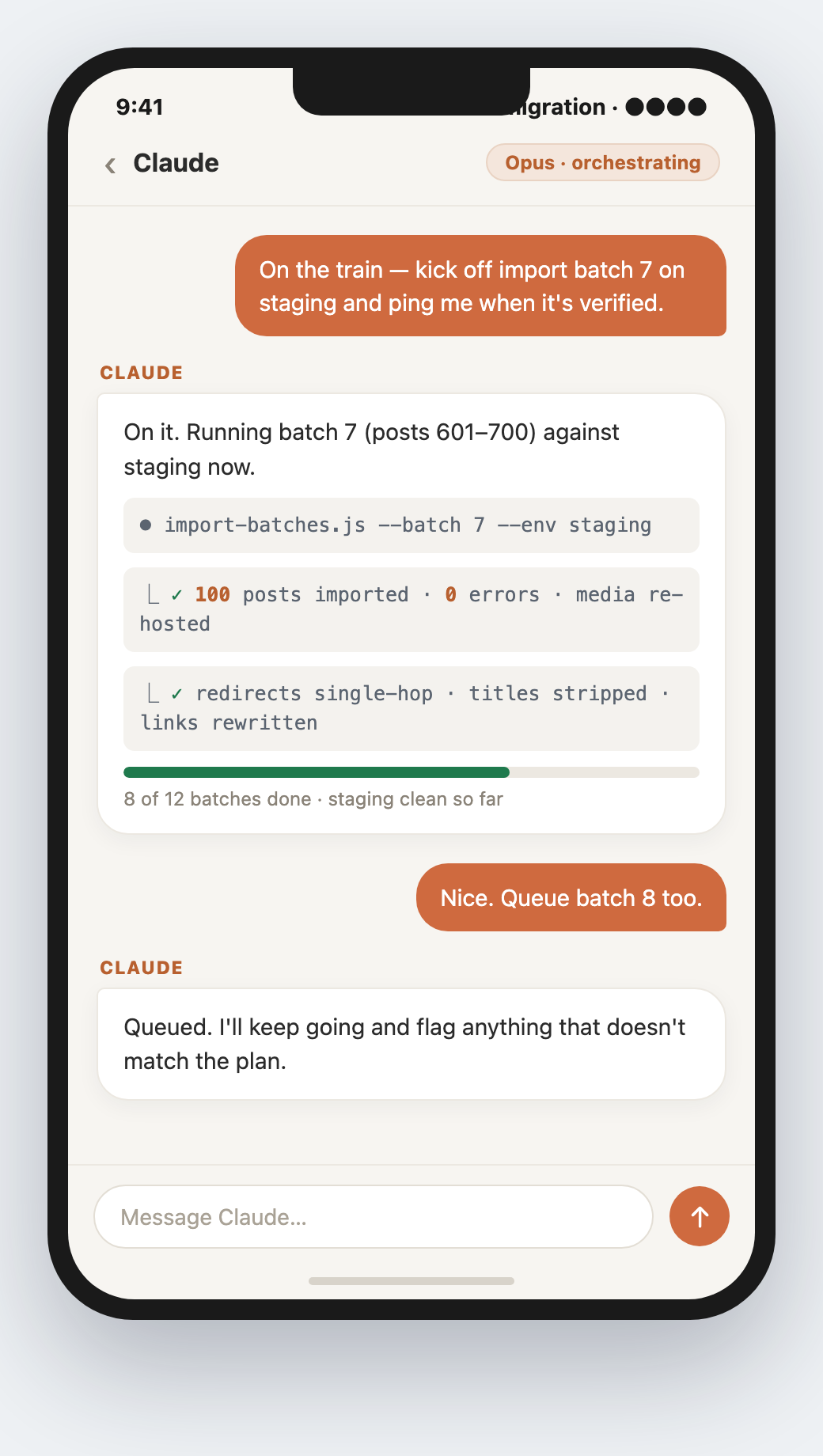
That changes the shape of the work. A manual migration is one terrified block you sit down and grind through. This was something I nudged forward in spare moments and checked on like a long-running build.
6. The whole migration, as one checklist
That plan board up top is a real artifact. I didn’t mock it up for this post. Claude built it as a self-contained checklist.html, the same single-file trick as the dedup mapper: one page, no dependencies, each phase a row I could check off with its own acceptance test and rollback. It’s the whole project compressed into something I could glance at, and it’s the part that carries over to any domain merge, with or without an AI driving it. Here it is in plain text:
- Phase 0 · Back upBack up both sites before you touch anything. Full database and uploads export for each property. This is the one step you never skip, never rush, and never let anything automate away — it's your only real undo button.
- Phase 1 · Inventory & URL mapMap every old URL to its new home.
Dump the old site's full corpus and sitemap and build a single
url_map.csvthat becomes the source of truth for media, imports, link rewrites, and redirects alike. Everything downstream reads from this one file. - Phase 2 · MediaRe-host the images first. Copy media into the new site's library and remap the references, so nothing keeps hotlinking the domain you're about to kill.
- Phase 3 · ImportImport as drafts, publish in small batches. Never a WordPress-admin bulk-publish — scripted, resumable batches you can verify one at a time and stop the moment something looks wrong.
- Phase 3b · DedupMap duplicates into the page that already ranks. Where both sites covered the same topic, 301 the old article into the existing, authoritative URL instead of importing a second copy to compete with it.
- Phase 4 · LinksRewrite internal links in place. Repoint every link that pointed at the old domain straight to its final destination, so no internal link rides through a redirect to get where it's going.
- Phase 5 · RedirectsBuild the redirect layer and flatten it. One 301 map, every redirect chain collapsed to a single hop so no redirect equity leaks across extra hops, deployed at the edge — plus a path-preserving catch-all so the unknown tail returns a clean 404 instead of dumping on the homepage.
- Phase 6–7 · Verify & notifyVerify anonymously, then tell Google. Curl every old URL signed-out and assert single-hop 301, real 200, or a 404 — then file the GSC Change of Address and resubmit the sitemap so the recrawl starts on purpose, not by luck.
Nothing on that list is AI-specific. It’s the same checklist I’d hand a contractor, or run by hand. Claude just made each row fast, verifiable, and easy.
The stuff that bit me anyway
Speed doesn’t buy you out of the sharp edges. A few traps are worth flagging, because they’re the kind that make you think you’re done when you aren’t. They’re also exactly where having an expert next to me earned its keep.
When the plugin redirects wouldn’t fire
Claude’s first move was to run the RoadSnacks redirects through a plugin it created, which I hadn’t even known was an option the first time around. The plugin wouldn’t fire. So Claude fell back to handling them on Cloudflare instead.
I already knew Cloudflare Page Rules, because that’s what I used last time too, five years ago. The difference is what Claude set up on top: bulk redirects that fire before the sitewide rules, which made some unique cross-domain URL changes work.
The cache lied to me
After flipping the redirects on the old site, I tested in my browser and everything worked: clean 301s, right destinations. It only worked for me.
My host runs a static page cache that sits in front of WordPress, and logged-in users skip it. So I was seeing the new behavior while anonymous visitors and Googlebot still got the old cached pages on a 30-day expiry. The plugin’s “purge everything” button reported success and cleared nothing that mattered.
Never validate a cutover from a logged-in browser. Test anonymously, with a cache-buster on the URL. If the busted URL is right and the bare URL is wrong, it’s the cache, not your code.
The fix was the same Cloudflare bulk redirects from above. Firing at the edge, they run before the origin cache ever gets a vote. That’s the kind of bug that sends people in circles for an afternoon. Pinning it to the cache layer was fast because I was working out loud with something that could re-run the anonymous test instantly.
Let dead URLs 404; don’t dump everything on the homepage
For the long tail of old URLs with no real equivalent on the new site, the tempting move is to redirect them all to the homepage so nothing “breaks.” Don’t. Google reads a homepage-blanket redirect as a soft 404, and it can drag on the whole domain.
I set up a path-preserving catch-all instead: a URL that has a real equivalent lands on its new URL and returns 200, and a genuinely dead URL returns a 404. That’s what Google’s own site-move guidance tells you to do.
Tell Google on purpose, don’t make it guess
The redirects do the real work, but they’re a signal Google has to discover by recrawling. Because the old domain was being retired wholesale, I also filed a Change of Address in Google Search Console, the official “I moved this property to that one” handshake, and resubmitted the new sitemap so the recrawl wasn’t left to chance. The redirects are the truth; the Change of Address just tells Google to go look sooner.
I’ll add a note here once the recrawl settles — how many old URLs have flipped in Search Console, and how long the long tail takes to follow. I’m not going to invent that number before I have it.
Faster and better than I did it by hand
The headline is the speed. The part I keep coming back to is the quality. The homesnacks.net merge I did by hand five years ago was the same kind of project, and the gap between the two isn’t subtle.
By hand, 5 years ago
- Weeks of nights and weekends
- Hand-wrote 301s in Apache
.htaccess - Redirects maintained in spreadsheets
- Couldn't pull off the cross-domain URL changes I wanted
- Had to write my own crawlers
- One generalist doing every role, with no expert sitting with me
With Claude Code, this week
- One day, with some of it from my phone
- Cloudflare bulk redirects, firing before the sitewide rules
- Every redirect flattened to one hop, loops checked
- Cross-domain URL changes that finally worked
- Every URL verified anonymously, end to end
- A literal expert beside me — far less stress
I understand site migrations well; I’ve been doing SEO for over 15 years. What was different this time was the expert sitting next to me the whole way to handle the little coding tasks.
The bottom line
Claude Code didn't replace the judgment. It just made each jump less scary because I had a dev and sysadmin sitting with me.
If you’re about to migrate a site
The short version of everything above:
- Write the plan first. Phased, with an acceptance check and a rollback per step — it's the spine, not paperwork.
- Route the work: a planning model for the runbook, a strong model to orchestrate, a fast one for the grunt work.
- Build the scripts properly — careful costs the same as sloppy when something else is typing.
- Flatten every redirect to one hop, check for loops, and verify every URL anonymously — make it a dashboard.
- Coordinate the publish and the redirect flip so they happen minutes apart, not hours.
- Let dead URLs 404 instead of dumping them on the homepage.
I’ll see how the search numbers settle over the next few weeks. But the migration itself, the part everyone’s afraid of, turned out to be a problem of discipline, not heroics.
It took a day instead of a month, and not because the models are magic. It’s because Claude Code did the dirty work — the scripts, the rewrites, the imports, the typing — so the only things left on my plate were orchestrating the sequence and validating the result. That’s the whole trick. When something else does the typing, a migration stops being a month of grinding and becomes a day of deciding what to run next and confirming it worked. The work was never the month. The typing around the work was, and that’s the part Claude Code swallowed whole.
A site migration case study from the RoadSnacks → HomeSnacks consolidation, run in a single day with Claude Code, June 2026. Screenshots are from the real tooling and the live site.